
Have a Question?
Understanding Slurm Partitions and Cluster Resources
In Slurm, a partition is a grouping of computing resources within a cluster. Partitions helps us to manage CPU and GPU resources based on different criteria such as hardware specifications, user groups, or job requirements. Each partition may have its own set of nodes, memory limits, and other configuration parameters. This article will provide a brief picture about the partitions available on ARCC2 cluster and the essential slurm commands to obtain partition status and other information.
1. CPU and GPU Partitions on ARCC2
There are three CPU and four GPU partitions on ARCC2 cluster. The resource information are furnished in the tabulation below.
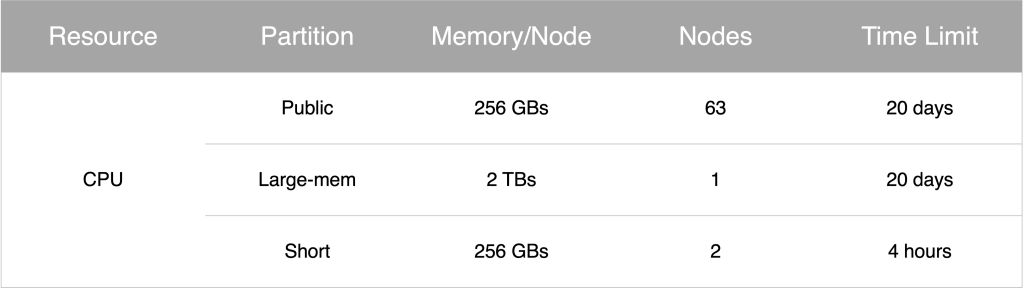

2. Viewing the the number of partitions
To list all available partitions on ARCC2 use the following command:
$ sinfo
This command will display a summary of the cluster’s partitions, their state, node count, and timelimits
$ sinfo
PARTITION      AVAIL  TIMELIMIT  NODES  STATE NODELIST
public*           up 20-00:00:0      2  down* compute-[06,42]
public*           up 20-00:00:0      2  drain compute-[21,28]
public*           up 20-00:00:0     43    mix compute-[02-04,10-12,14-16,19-20,22-23,25-26,29-40,46-48,50-54,61-68]
public*           up 20-00:00:0     16  alloc compute-[01,05,13,24,27,41,43-45,49,55-60]
large-mem         up 20-00:00:0      1   idle lg-compute-1
short             up    4:00:00      2   idle compute-[69-70]
gpu-v100          up 20-00:00:0      1    mix gpu-compute-1
gpu-a100          up 20-00:00:0      1  drain gpu-compute-3
gpu-a100          up 20-00:00:0      6    mix gpu-compute-[6-11]
gpu-a100-mid      up 20-00:00:0      1    mix gpu-compute-4
gpu-a100-small    up 20-00:00:0      1    mix gpu-compute-2
cryo              up 20-00:00:0      1    mix gpu-compute-5
3. Checking the node and memory information or all partitions
To get the information about the status of the nodes and the memory allocation of all the partitions use the command:
$ sinfo --format="%15P %28N %4c %8m %G"This will provide details about the node, node count, and available memory and the GPU info of the given partition.
%P: Represents the partition name.%N: Represents the node name.%c: Represents the node count in the partition.%m: Represents the memory available on each node in the partition.- %G: Represents the GPU instances and memory/instance of the partition.
PARTITION       NODELIST                     CPUS MEMORY   GRES
public*         compute-[01-06,10-16,19-68]  64   256000   (null)
large-mem       lg-compute-1                 64   2048000  (null)
short           compute-[69-70]              64   256000   (null)
gpu-v100        gpu-compute-1                64   256000   gpu:v100:2
gpu-a100        gpu-compute-[6-11]           64   1024000  gpu:a100:2
gpu-a100-mid    gpu-compute-[3-4]            64   1024000  gpu:3g.20gb:4
gpu-a100-small  gpu-compute-2                64   1024000  gpu:1g.5gb:14
cryo            gpu-compute-5                64   1024000  gpu:3g.20gb:4
4. Using the qinfo command
You can also use the command qinfo to get the information about the job queue and core/GPU unit resource availability in all the partitions.
$ qinfo
public:  1979/3634 cores in use (1655 available)  	 5 nodes available	 0 jobs in queue
           large-mem:  0/64 cores in use (64 available)  	 1 nodes available	 0 jobs in queue
               short:  0/128 cores in use (128 available)  	 2 nodes available	 0 jobs in queue
            gpu-v100:  0/2 GPUs in use (2 available)	 0 jobs in queue
            gpu-a100:  12/12 GPUs in use (0 available)	 66 jobs in queue
        gpu-a100-mid:  8/8 GPUs in use (0 available)	 5 jobs in queue
      gpu-a100-small:  0/14 GPUs in use (14 available)	 0 jobs in queue
                cryo:  2/4 GPUs in use (2 available)	 3 jobs in queue